Email classifier · Write-up
Sorting email per message instead of per sender, with a small classification model, the Microsoft Graph API and a few rules in code.
The problem
Every day, Home Depot sends me an ad. They also send my receipts, my card statements, and about every 60 days, a 10% off coupon I actually want. Same sender address, three very different kinds of email.
Sender rules can't tell those apart. Move everything from Home Depot to a folder and the receipts go with the ads. Leave it all in the inbox and the ads bury everything else. I'd tried the usual fixes over the years: folders per sender, inbox zero, a "delete after 90 days" folder fed by rules. They all failed the same way. Either something I needed got moved out of sight, or the rules took more upkeep than the mail was worth.
Home Depot is the clearest example, but the same thing is true of most companies I buy from. This page walks through what I built for my personal Outlook.com mailbox, and uses the Home Depot mail to show how it behaves.
1. Write the outcome first
Before writing any code, I wrote a plan that only described the outcome: what should happen to each kind of email. How it would be classified was left open. A few principles came out of that, and they ended up driving almost every technical decision:
- Decide per message, not per sender.
- Mail stays in the inbox. Search is how I find things, so moving mail makes it harder to find, especially on the phone.
- Categories are tags. A message can have several, and Outlook shows them on the iPhone and on every PC.
- Unread means "needs my attention." Everything else is marked read when it's sorted.
- The safer outcome wins. If any category says keep it, it's kept. If any says leave it unread, it stays unread.
- When unsure, do nothing. An untagged, unread message is the worst case, and that's fine.
Each category carries one of four behaviors. The ones that matter for Home Depot:
| Category | Example | Read? | Kept |
|---|---|---|---|
| Bills | Card statement, payment due | Stays unread | Forever |
| Receipts | Order or payment confirmation | Marked read | Forever |
| High Value Coupons | 10% or more off a whole order | Stays unread | 90 days |
| Promotions | The daily ad | Marked read | 90 days |
| Coupons | $5 off select items | Marked read | 90 days |
| (none) | Not sure | Stays unread | Forever |
There are fourteen categories in all, including Personal, Security, Shipping, Codes and Newsletters. A Home Depot receipt with a coupon at the bottom gets both Receipts and Coupons: it's marked read because neither says otherwise, and it's kept forever because Receipts says so. Nothing is deleted unless every category it carries is a short-lived one.
2. The pipeline
It's a set of scripts run with Bun,
a fast JavaScript runtime, with no dependencies: just fetch against two HTTP APIs.
Each message goes through the same steps:
- Read the inbox Microsoft Graph, 50 messages per page, with the body, categories and read state.
- Check contacts first Mail from someone in my Outlook contacts is tagged Known Contact in code and never leaves the mailbox.
- Prepare the text Sender, subject and the body as plain text: HTML stripped, whitespace collapsed, first 4,000 characters.
- Ask the model One request per email to Jev, with every question at once. It returns a number per question.
- Decide in code A pure function turns the numbers into categories, read or unread, and kept or short-lived.
-
Apply with Graph
Batched
PATCHrequests add categories and mark mail read. A separate script deletes short-lived mail after 90 days.
Everything runs report-only by default. A run writes a CSV and a Markdown report of what
it would do, and nothing in the mailbox changes until I run the same command with
--yes. That made it safe to tune on real mail.
3. Asking questions, not for answers
The model is Jev, from TypeSafe. It isn't a chatbot. You give it some text and a set of typed questions, and it returns a probability for each one. It doesn't write anything back, so there's no output to parse and nothing for it to make up.
Every category is its own yes/no question, with criteria that say where the
line falls. Jev reads questions literally, so the wording is most of the tuning. Here are
two of the fourteen, from lib/questions.js:
receipt: {
  instructions: "Does this confirm something the recipient already bought, ordered, booked, or paid for?",
  criteria: {
    true: "An order confirmation, receipt, payment confirmation, or booking confirmation for something that already happened",
    false: "An advertisement, or an invitation to buy or book something",
  },
  category: "Receipts",
},
promotion: {
  instructions: "Is this advertising a sale, a product, a service, or an offer?",
  criteria: {
    true: "Promotes something to buy, join, book, or apply for, including loyalty offers and limited-time deals",
    false: "A receipt, a statement, an account notice, or subscribed content with nothing being sold",
  },
  category: "Promotions",
},
All the questions go in one request, so each email is one call. The request is plain JSON:
POST https://api.typesafe.ai/v1/systemone
{
  "model": "jev-1.13.0",
  "state": { "from": "...", "subject": "...", "body": "..." },
  "questions": {
    "receipt":   { "type": "noul", "instructions": "...", "criteria": { ... } },
    "promotion": { "type": "noul", "instructions": "...", "criteria": { ... } },
    ...
  }
}
The model is pinned to one version rather than jev-latest, because the
thresholds below are tuned against it. A new version gets its own trial before I switch.
A score for "how good is this coupon"
The coupon question didn't work as a yes/no. Asked "is this 10% or more off?", the model
rated a store's "Save 15% Sitewide" email at 0.33. Comparing numbers isn't what it's good
at. Describing situations is. So bigDiscount became a score: the
model places the email between four described levels, and the category applies from 1.5 up.
bigDiscount: {
  type: "score",
  instructions: "How large a discount does this give the recipient on something they buy?",
  criteria: [
    "No discount on a purchase: nothing is being sold, or what's offered is a credit card, ...",
    "A narrow discount: free shipping, a few dollars off, or a discount limited to selected items",
    "Around 10% to 15% off a whole order, or a sale across most of the store",
    "20% or more off a whole order, or a discount offered only to cardholders or members",
  ],
  category: "High Value Coupons",
  apply: 1.5,
},
The same "15% sitewide" email scored 2.07 once it was asked this way. Home Depot's "Nice Move—Get 10% OFF Your Next Purchase" scored 1.96. The line sits at 1.5 on purpose: a wrong guess costs one extra unread email, and a miss loses the offer.
4. Turning probabilities into actions
The model only answers. Code decides. The thresholds live next to the questions, so tuning happens in one file:
| Answer | Means | What code does |
|---|---|---|
| 0.8 or more | Yes | Apply the category |
| 0.3 to 0.8 | Unsure | Leave it off |
| Under 0.3 | No | Leave it off |
| Spam at 0.97+ | Sure it's spam | Move to Junk |
decide() is a pure function over the answers: no network and no mailbox, so
every rule has a unit test. Trimmed down, the core is:
const categories = categoryKeys
  .filter((key) => p(key) >= (questions[key]?.apply ?? thresholds.yes))
  .map((key) => nameOf(key));

const behaviors = categories.map((name) => categoryByName(name)?.behavior);

// Nothing applied means "not sure", and not sure stays unread.
const staysUnread =
  categories.length === 0 ||
  behaviors.some((b) => b === "attention" || b === "surface");

// Deleted only if every category is short-lived.
const deleteAfter90 =
  categories.length > 0 &&
  behaviors.every((b) => b === "expire" || b === "surface");
The bulk rule
The first trial left too much untagged. Bulk mail would often split its confidence: a little promotion, a little newsletter, a little notification, none of them reaching 0.8. But those categories all get the same handling. So when nothing is sure on its own, the short-lived answers add up to 0.8 or more, the strongest is at least 0.4, and nothing outside that group is even close, the strongest one is applied. Which label wins can't change what happens to the message, so it's safe to be less strict there.
5. Applying it with Microsoft Graph
-
Changes go through
$batch, 20 requests at a time, retrying anything throttled after the wait Graph asks for. Outlook caps a mailbox at about 10,000 requests per 10 minutes, so a long run pauses. That's expected, not a failure. - The classifier only adds. Categories I set by hand are kept, and it never marks a read message unread.
{
  id: message.id,
  method: "PATCH",
  url: `/me/messages/${encodeURIComponent(message.id)}`,
  body: {
    ...(added.length > 0 ? { categories: [...existing, ...added] } : {}),
    ...(markRead ? { isRead: true } : {}),
  },
}
Deleting is a separate script. It only touches mail where every category is short-lived
and the 90 days are up. It skips anything flagged, which is how I keep a coupon past its
time, and anything carrying a category it doesn't know, because that's one I added. One
Graph detail worth knowing: it uses POST …/move to Deleted Items, not
DELETE. Graph's DELETE skips Deleted Items and goes straight to
Recoverable Items, which isn't what "delete" means to anyone using Outlook.
6. What the trials changed
- Read the whole message. The first version sent only the 255-character preview and read the body only when it would change the outcome. Too much bulk mail came back with no category, and untagged mail stays unread. Sending up to 4,000 characters of body fixed most of it. It costs more text per request, but still fractions of a cent.
- Less text is more accurate. Stripping the HTML and trimming the body isn't just about cost. Jev gets less accurate as unrelated text piles up.
-
Spell out the edge cases. Jev reads questions literally, so each
question's
criteriasay where the line falls. Thebillquestion, for example, says that a receipt for money already paid is not a bill, andcodesays a promo code isn't a sign-in code.
Results on Home Depot
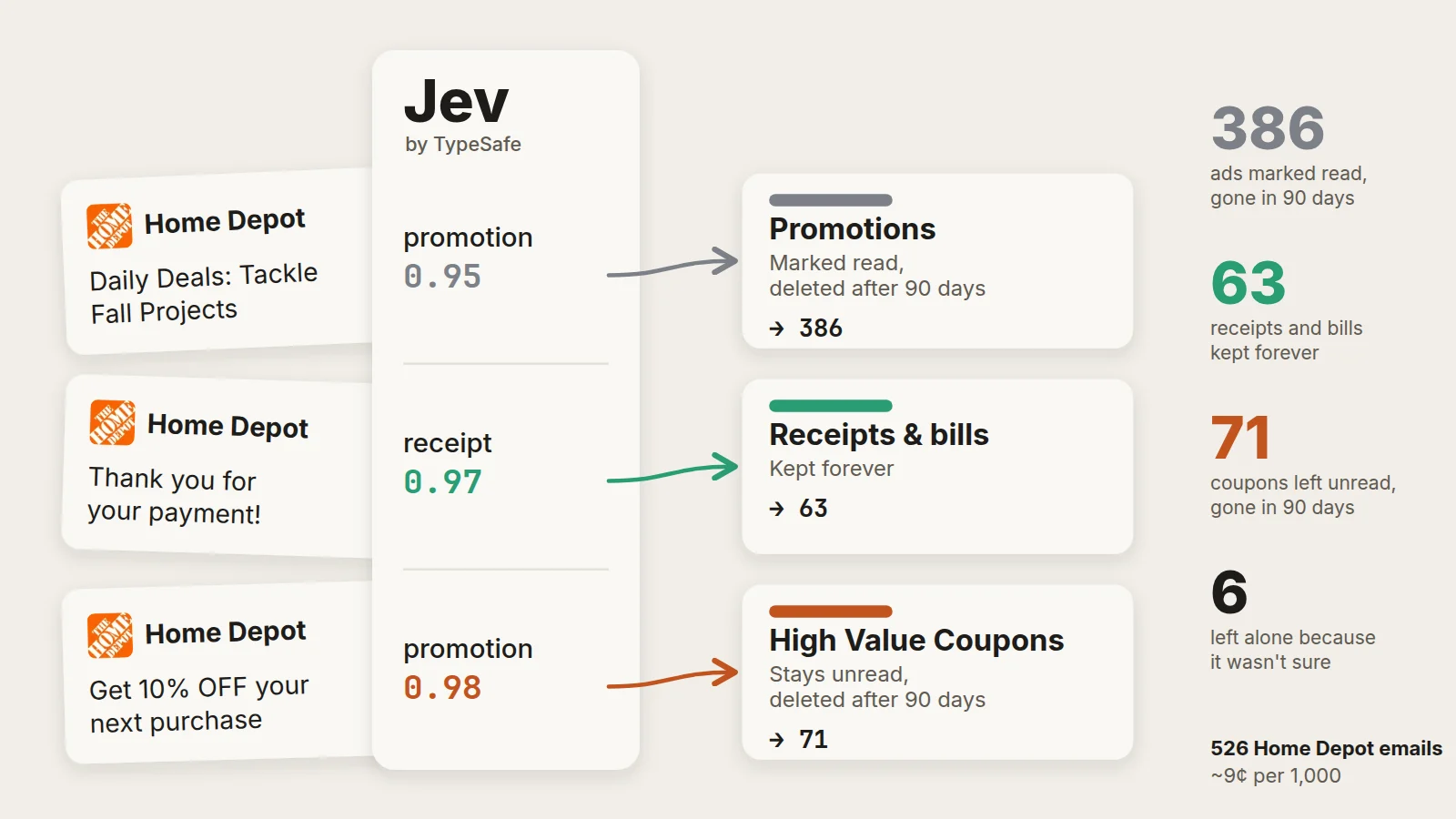
Across 526 Home Depot emails from the trial runs:
Same sender, different outcome: a "Thank you for your payment!" came back 0.97 receipt and 0.03 promotion, while the daily ads come back around 0.98 promotion.
Cost
TypeSafe charges $0.042 per million input tokens, and output is free. With the body included, an email runs about 2,100 input tokens, questions and all. In practice that's about 9 cents per 1,000 emails, or under 30 cents a month at 100 emails a day. Money was never the reason to send less text. Privacy was.
Safety and privacy
- Email is untrusted input. A scam email could include text aimed at the model. But Jev can only return numbers, not take actions, so the worst case is a wrong category. The thresholds, "when unsure, do nothing" and the 0.97 bar for Junk limit the damage.
- The model never deletes anything. Deletion only happens in code, after 90 days, to Deleted Items, where it can be recovered.
- Less email leaves the mailbox. Mail from my contacts is decided in code and never sent. For everything else, the body goes to TypeSafe, which says it doesn't train on customer data. That's a trade I made on purpose, and it's why the reports that list senders and subjects stay out of the repository.
What I took away
Not every AI problem needs the biggest model. This one needed a small, fast, low-cost model to answer narrow questions, and code to make every decision that matters.
The same pattern works on real business problems, not just my inbox. Anywhere people read a steady stream of text and sort it by hand, such as support tickets, invoices, contract clauses, survey comments or incoming leads, the steps are the same:
- Write down the outcome first: what should happen to each kind of item.
- Turn each decision into a narrow question the model can answer with a probability.
- Keep the rules in code, where the thresholds and actions can be reviewed and tested.
- When the model isn't sure, a person decides.
At about 9 cents per 1,000 items, cost stops being the question. The hard part is the one it's always been: knowing what outcome you want. Once that's written down, the AI only has to answer questions.